Thursday, May 23, 2013

Manual Removal, Best Way to Get Rid of XP Micro Antivirus Online Scan

Is this XP Micro Antivirus Online Scan real or fake? Did this program keep reporting infections and you don't even use your computer those days? That's quite confused. Now, I'm going to expose the truth about this so-called antivirus program. Follow me please.

What is XP Antivirus Online Scan exactly?

XP Micro Antivirus Online Scan can be classified as a tricky rogue program which always show to us as an antivirus program in our computer. It usually comes with another Trojan infection to your computer when your computer targeted by some sort of hacked websites, like a pornographic website. Cyber hacker is the one who design it with the purpose of money scam and personal information stealing to computer users. In order to pretend as an normal antivirus software, it usually make a full scan for your computer firstly and reports some deadly infection which can make a huge damages in your computer if you don’t delete it in time. To help you remove it, you need to pay for the fee or buy a full version of this program. Also, if you pay it anyway, those so-called infections may disappear temporarily but it can back to your computer time to time with money asking which just like a bottomless pit. What’s worse, your personal information can be collected by hackers by means of XP Micro Antivirus Online Scan.
To guard against this happen to you, manual removal is most effective method to that and to completely eliminate this threat, we need to detect and remove its related processes, files and registry entries. Wanna learn those processes? Pleases follow this post which will show you step by step.

Tuesday, May 21, 2013

SmartPCFix Malware Manually Removal

Is your computer infected with SmartPCFix Malware? This step-by-step guide can help you safely and quickly remove SmartPCFix.

What is SmartPCFix Malware exactly?

SmartPCFix Malware is a rogue program pretending as a normal antivirus program in your computer. It is created by cyber criminals with the purpose of money scam to computer users who suffer it. Tricky as it is, SmartPCFix usually bundled with some kind of freeware on the Internet. Once you download and install it into your computer, this nasty software can coming with it by using the vulnerability of your computer. First, it will start a full scan to your computer and reports lots of nonexistent virus infection in your computer which may damage your computer deadly, and the way to solve this problem is buy the full version of the “antivirus program”. Moreover, you may not really get rid of this annoy by paying the fee, it will come back to your computer again and again.
Besides, just like other rogue program, it can also carry out a series of virus or Trojan infection to your computer. Especially, those significant data stored in your computer is absolutely the best game for cyber hacker to steal. In a word, this program will definitely take your computer into a very bad condition. Since it can’t be spot and deleted by your antivirus completely, manual removal is the most infected way to get rid of it. Wanna learn how to remove manually? Please follow the post.

How to Manually Get Rid of Search.swagbucks.com Redirect?

Search.swagbucks.com is a dangerous infection. Can’t get rid of Search.swagbucks.comwith your antivirus software? Need help to manually delete it? This step-by-step guide will help you completely remove Search.swagbucks.com. Learn more details.

Introduction of Search.swagbucks:

There has a tricky and nasty browser hijacker called Search.swagnucks which has disturbed computer user to make a normal use of computer recently. It is an infection that created by cyber criminals aim to contact browser in your computer. Also, this browser hijacker can also bring your computer further damages and more infections if you don’t get rid of it timely.
As normal, those cunning cyber hackers will implant it in some hacked websites or “freeware” that you may download easily on the Internet. As long as you visit those unhealthy websites or install those “freeware”, your computer will be targeted by it. Then, it will start a terrible chaos in your computer, especially in your browser. Obviously, you may find that the homepage of your computer has turn to swagbucks.com without your permission and no matter how many time you tried to change it back, it won’t work. What’s worse, it also can collect those significant information from your computer stealthily for malicious purpose.
So, it is about the time to get rid of it now in you suffering this Search.swagbucks.com. To completely eliminate this threat, we need to detect and remove its related processes, files and registry entries. Wanna learn something useful, please follow this post.

Sunday, May 19, 2013

Mixidjv30.ourtoolbar.com redirect manual removal

Is your computer infected with Mixidjv.30.ourtoolbar.com virus? Is Mixidjv.30.ourtoolbar.com  fake or genuine? This following article will show you how to safely and quickly remove Mixidjv.30.ourtoolbar.com  by manual way.

Decription of Mixidjv.30.ourtoolbar.com Virus:

Mixijv30.ourtoolbar.com is a new “work” of cyber hacker which is extremely tricky and annoying. The purpose of making Mixidjv30.ourtoolbar is for browser attacking which also can spread from one computer to another. Just like other browser hijacker, it can pretend as a normal website in your computer that you may not notice it easily. However, it is a huge disaster for your computer for which it can change the settings of your system without your permission and authorization. One thing that you may obviously notice is that the homepage has turn to mixidjv30.ourtoolbar.com, and no matter how many times you try to set it back, it still show you this once you open your browser. Moreover, this browser hijacker is a terrific tool for cyber hijacker to collect personal information from computer. Those data could be used for malicious and illegal purpose.
With its serious threats, we should delete it without any hesitation. As for the situation which antivirus can’t delete it completely, manual removal is become the best way to handle it. If you want to learn how to manual removal this nasty browser hijacker out of your computer, please follow this post.

How to Get Rid of Luhe.Sirefef.A Virus Manually

Are you fed up with Luhe.Sirefef.A threat? This virus will not allow you to remove it by antivirus and can mess up your computer. Do you want to know the effective way to remove Luhe.Sirefef.A virus thoroughly? You can learn from this post which will show you effective removal guide to get rid of Luhe.Sirefef.A completely.

What Luhe.Sirefef.A Virus Really is?

Recently, a Trojan virus called Luhe.Sirefef.A is often be reported by antivirus program of personal computer. It is a nasty and dangerous Trojan virus that created by cyber criminal aim to make illegal movement in your computer system, which can start a backdoor for remote control allowance which hacker use it to remotely attack your computer. What’s worse, this virus can also allow malicious program, spyware or rogue program downloading without your permission and authorization in your computer and your may obviously find that lots of unfamiliar programs are running in your computer comes from nowhere. After system settings changes done, the antivirus program can hardly and delete it completely.
To prevent Luhe.Sirefef.A, the first thing you need to know is how it gets into your computer. Usually, hackers prefer to implant it to some kinds of websites with high page view or some popular freeware. Once you click the infected links unconsciously in that websites or install the “freeware” into your computer, this virus can sneak into your computer by using the vulnerability of your computer.
In conclusion, since this virus has a huge potential threats to your computer even the whole Internet world, you should get rid of it immediately once your spot it. Tricky and stubborn as this virus is, the antivirus program in your computer can not handle it effectively. So, the manual removal could be the best way to handle it. Now, please follow this post and learn some useful skills for it.

Saturday, May 18, 2013

The Best Way to Help You Out of Trojan:Win32/Estiwir.A Virus

Has your antivirus detected a threat named Trojan:Win32/Estiwir.A Virus? If it’s the situation you are in, you should go into action to protect the computer since it’s a malicious infection.

What is Trojan:Win32/Estiwir.A Virus?

Trojan:Win32/Estiwir.A Virus is an extremely dangerous and stubborn Trojan virus that created by cyber hackers who prepare to make huge damages or chaos in your computer via this virus. Usually, cyber hackers will put it on some popular and hacked websites, and your computer will be infected once you click it unconsciously. Also, some freeware or rogue program still could be a best place to implant. As long as it breaks into your system successfully, the settings of your system will be changed without any reporting and authorization. In this case, the antivirus program in your computer can not spot it and delete it completely. Moreover, it can also start a background downloading with rogue program, spyware and other rogue programs into your computer. You may obviously find those program are comes from nowhere in your computer. If you like to keep your personal information into your computer, it will become the best game to hunt. With this virus running in your computer, your computer can do a normal performance. In conclusion, since its deadly infection, please don’t hesitate to get rid of it to avoid unnecessary further damages. Now, please follow the post and learn something useful about manual removal of Trojan:32/Estiwir.A Virus.

How to Remove Searchpig.net Redirect Removal Manually?

Has your antivirus detected a threat named Searchpig.net? If it’s the situation you are in, you should go into action to protect the computer since it’s a malicious infection.

What is Searchpig.net exactly?

Searchpig.net Redirect is an extremely tricky and annoying browser hijacker, attacking computer users whoever infected with it. Just like other browser hijackers, it mainly aims to browser invading to your computer. Obviously, you may find that the homepage of your browser turns to searchpig.net without any other noticed, and no matter how many time you try to change it back, it back to this situation again and again. Some people may believe that this is just a normal website with no harm to computer. However, the thing is that this stuff can not only change the settings of your system which can enable malware, rogue programs or adware downloading in your computer, but also steal the significant information in your computer for malicious purpose. You will find that lots of unfamiliar program running in your computer without your permission or authorization. That is a huge disaster for computer and users, which designed by cyber criminals aim to illegal purpose.
Also, since it can’t be removed by your antivirus, the manual removal could be the best way to get rid of it. Now, I’m going to teach you how to do that step by step. Wanna to learn? Please follow this post. 

Corruptions About Searchpig.net:

1 Your computer is acting slowly. This web browser slows down your system significantly. This includes starting up, shutting down, playing games, and surfing the web.
2 Searches are redirected or your homepage and desktop are settings are changed. This is an obvious symptom of this infection.
3 The cyber threat will shut down your other anti-virus and anti-spyware programs. It will also infect and corrupt your registry, leaving your computer totally unsafe.
4 You are getting pestered with lots of pop ups. The hijacker virus infects your registry and uses it to launch annoying pop up ads out of nowhere.

Manual Removal Guide:


1) Boot your computer into safe mode with networking by restarting your computer and keeping pressing F8 key until Windows Advanced Options menu shows up, then using arrow key to select “Safe Mode with Networking” from the list and press ENTER to get into that mode.

2) Open your Task Manger by pressing Ctrl+Alt+Delete keys and end the processes of Searchpig.net:


3) The associated files to be removed in folders on Local Disk (note: new files are still created each month so far):
%AllUsersProfile%\random.exe
%AppData%\Roaming\Microsoft\Windows\Templates\random.exe
%Temp%\random.exe
%AllUsersProfile%\Application Data\.dll

4) Open your Registry Editor and then find out the registry entries of Searchpig.net virus to remove them (note: new registry entries are still made every month so far):
HKEY_CURRENT_USER\Software\Microsoft\Windows\CurrentVersion\Run\[RANDOM CHARACTERS].exe
HKEY_LOCAL_MACHINE\Software\Microsoft\Windows NT\CurrentVersion\Random
HKEY_CURRENT_USER\Software\Microsoft\Windows\CurrentVersion\Internet Settings “CertificateRevocation” =Random
HKEY_LOCAL_MACHINE\SOFTWARE\Microsoft\Windows\CurrentVersion\policies\Explorer\run\Random.exe

How to Clean up Searchpig.net with Spyhunter?

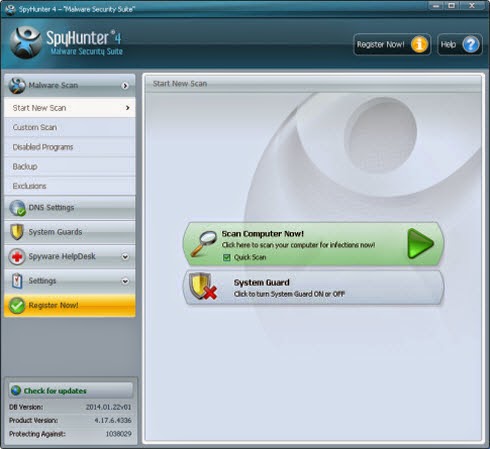
To clean up this threats from your computer easily, you can use Spyhunter antivirus program to deal with this issue. Meanwhile, Spyhunter can also secure your computer from any threats outside.

1. Download Spyhunter inside;
2. Do a full scanning after Spyhunter been installed;
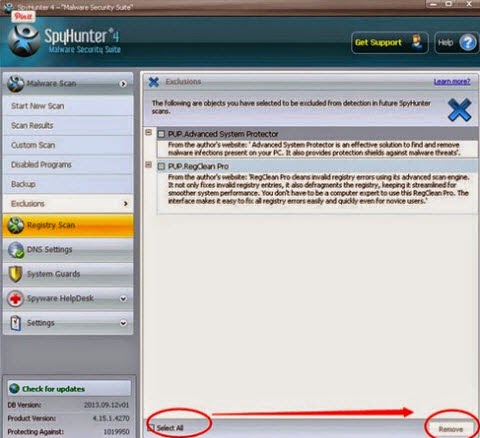
3. Select all threats found and remove it all.

Note: If you can not remove Searchpig.net with this manual removal procedure, you can use Spyhunter antivirus program to deal with this issue. Download Spyhunter to deal with this issue.